How to Configure SAML 2.0 for Namely
Supported Features
The Okta/Namely SAML integration currently supports the following features:
-
IdP-initiated SSO
-
SP-initiated SSO
-
JIT (Just In Time) Provisioning
Configuration Steps
-
Sign into Namely as an Administrator.
-
Select COMPANY on the top menu.
-
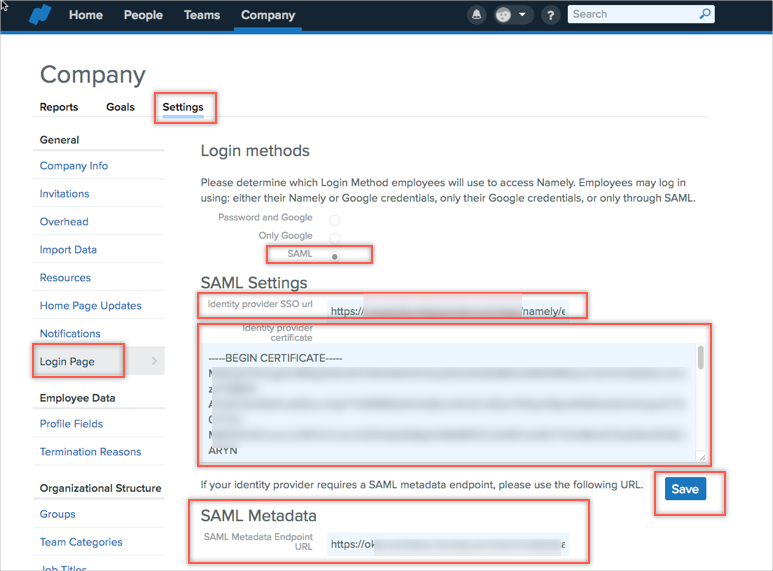
Navigate to Settings > Login Page, then enter the following (see screen shot at end of step for reference):
-
Login methods: Select the SAML radio button.
-
SAML Settings: Enter the following:
-
Identity provider SSO url: Copy and paste the following into this field:
Sign into the Okta Admin dashboard to generate this value.
-
Identity provider certificate: Copy and paste the following into this field (be sure to copy the Begin Certificate and End Certificate lines:
Sign into the Okta Admin dashboard to generate this value.
-
SAML Metadata: Copy and paste the following into this field:
Sign into the Okta Admin dashboard to generate this value.
-
Click Save:
-
-
-
Done!
Notes
SP-initiated SSO
-
Navigate to https://[yourSubDomain].namely.com/users/login.
Where [yourSubDomain] is the Namely subdomain for your organization.
-
Click the Single Sign On button.